Live Session
The Live Session is the operational context of the current game session. It is not just a timer, but a system that keeps together:
- session play time
- the timeline of important events
- quick DM notes
- the state of visited places
- active or completed quests
- combats that took place
- aggregated session statistics
In practice, when a live session is active, DnDino knows which campaign is currently running and uses that context to connect different parts of the app.
What It Is For
The live session is useful when you want to use DnDino during an actual table session, not just during preparation.
It is used to:
- track the session time
- keep an ordered timeline of the main events
- note down DM information quickly
- mark places as being visited or already visited
- view a dynamic summary of the session
- automatically collect data coming from combat
Where It Starts
The live session starts from the adventure dashboard, in the Live Session panel.
If no session is active, the panel shows:
- ready state
Start Live Sessionbutton
When you press the button, DnDino creates a new live session and marks it as the globally active session.
Only One Live Session at a Time
DnDino only manages one active live session at a time.
If a session is already open in another adventure:
- the current adventure cannot start a second one
- the dashboard shows a warning explaining that the active live session belongs to another campaign
What Happens When a Live Session Is Active
When a live session is running:
- the top bar shows its status
- the timer keeps updating
- places follow this context
- the timeline starts collecting events
- combat can also send data into the session
The live session becomes the backbone of the current game.
Session State
The live session can be in three states:
- active
- paused
- interrupted
Active
This is the normal state while the session is running. The timer keeps moving and events are recorded with the correct elapsed time.
Paused
The session can be paused from the adventure dashboard or from the top bar.
When paused:
- the timer stops
- the session still remains open
- it can be resumed later
Interrupted
If the app is closed while the session is still active, DnDino reopens it as interrupted on the next launch and records a dedicated event in the timeline.
This makes it possible to:
- avoid losing the session
- understand that an interruption happened
- resume work manually
The Live Session Panel in the Adventure Dashboard
Inside the adventure dashboard, the panel shows the current session state.
If the session belongs to the currently open adventure, the panel shows:
- session title
- real-time timer
- state (
RunningorPaused) - note that the player is global
- buttons:
PauseorResumeClose and Save
If there is no active live session:
- the
Start Live Sessionbutton appears
If a session is active but belongs to another adventure:
- the panel shows that the live session is currently in use elsewhere
Live Session in the Top Bar
When a live session is active, the app top bar shows a dedicated indicator.
For the full description of the top bar, see the Top Bar page.
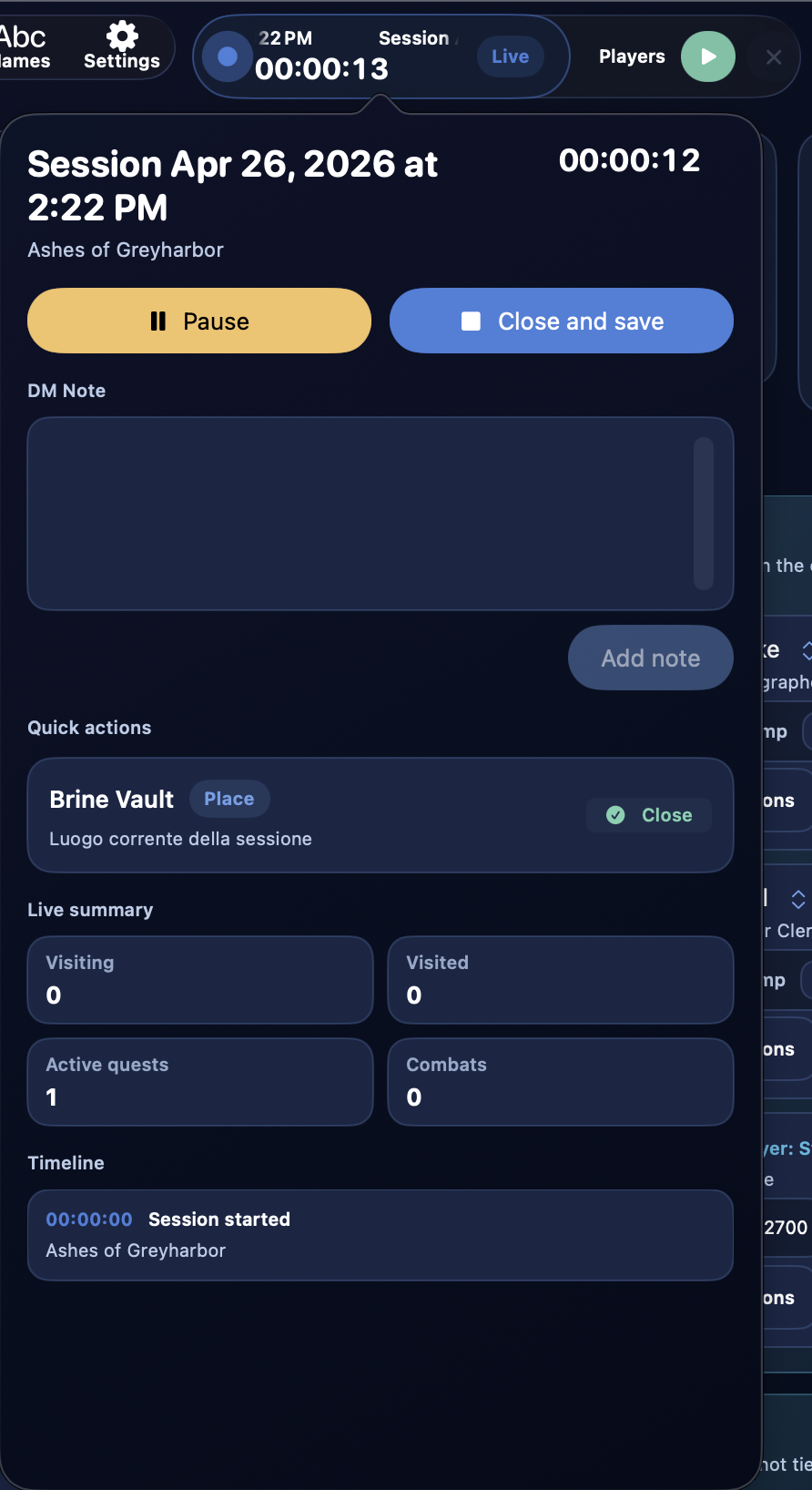
The Live Session Quick Panel
From the quick session panel you can perform actions without leaving your current screen.
Here you will find:
PauseorResumeClose and Save- quick editor for
DM Note - the session timeline
- quick actions for the place currently being visited
- compact live summary
Quick DM Note
Inside the live session popover you can write a DM Note and add it immediately to the timeline.
This is useful for quickly writing down:
- player decisions
- narrative prompts
- consequences to remember
- improvised ideas that emerged during the session
DM notes are recorded as timeline events.
Session Timeline
The timeline is the chronological log of the live session.
Each event stores:
- title
- detail
- the moment of the session when it happened
The timeline can contain both system events and DM notes.
Types of Recorded Events
The most important events that DnDino records automatically include:
Session startedSession pausedSession resumedSession interrupted because the app was closedEntered placeLeft placePlace state updatedQuest activatedQuest completedCombat startedCombat finishedDM Note
Connection with Places
The live session is directly connected to the places of the active adventure.
When you update a place inside the context of the live session:
- the state change is recorded
- the timeline updates
- the live summary changes accordingly
The most important place-related values tracked are:
- places being visited
- visited places
- active quests
- completed quests
Automatically Closing the Previously Visited Place
There is also a live-session-related rule in Settings: when a place is marked as Being visited, the place that was previously being visited can automatically be marked as Visited.
This only applies when a live session is active, and it is very useful for keeping exploration tracking consistent.
Live Summary
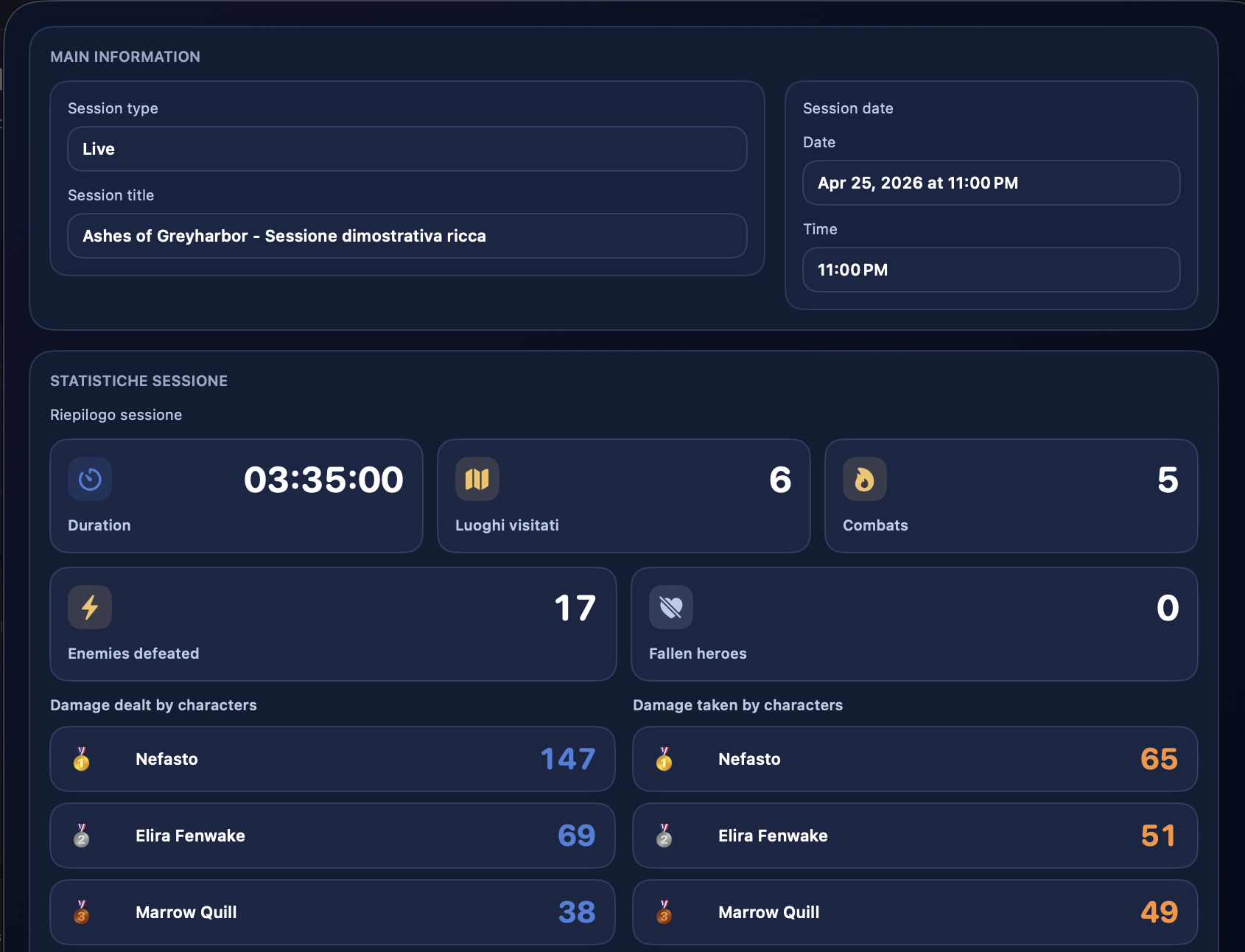
The live summary aggregates the most important data collected during the session.
Among the main values are:
- visited places
- places being visited
- active quests
- completed quests
- combats played
- defeated enemies
- fallen heroes
- total combat duration
The live session also keeps two very useful summaries for characters:
- damage dealt by heroes
- damage taken by heroes
Integration with Combat
The live session and combat are tightly connected.
When you start a combat during a live session, DnDino records:
Combat started
During combat it can collect:
- aggregated data used by the summary and statistics
When you close combat it records:
Combat finished- encounter duration
- defeated enemies
- fallen heroes
Damage Dealt and Damage Taken
The live session tracks damage through two separate rankings:
Damage dealt by charactersDamage taken by characters
This count is designed only for the adventure heroes, not for every participant in the encounter.
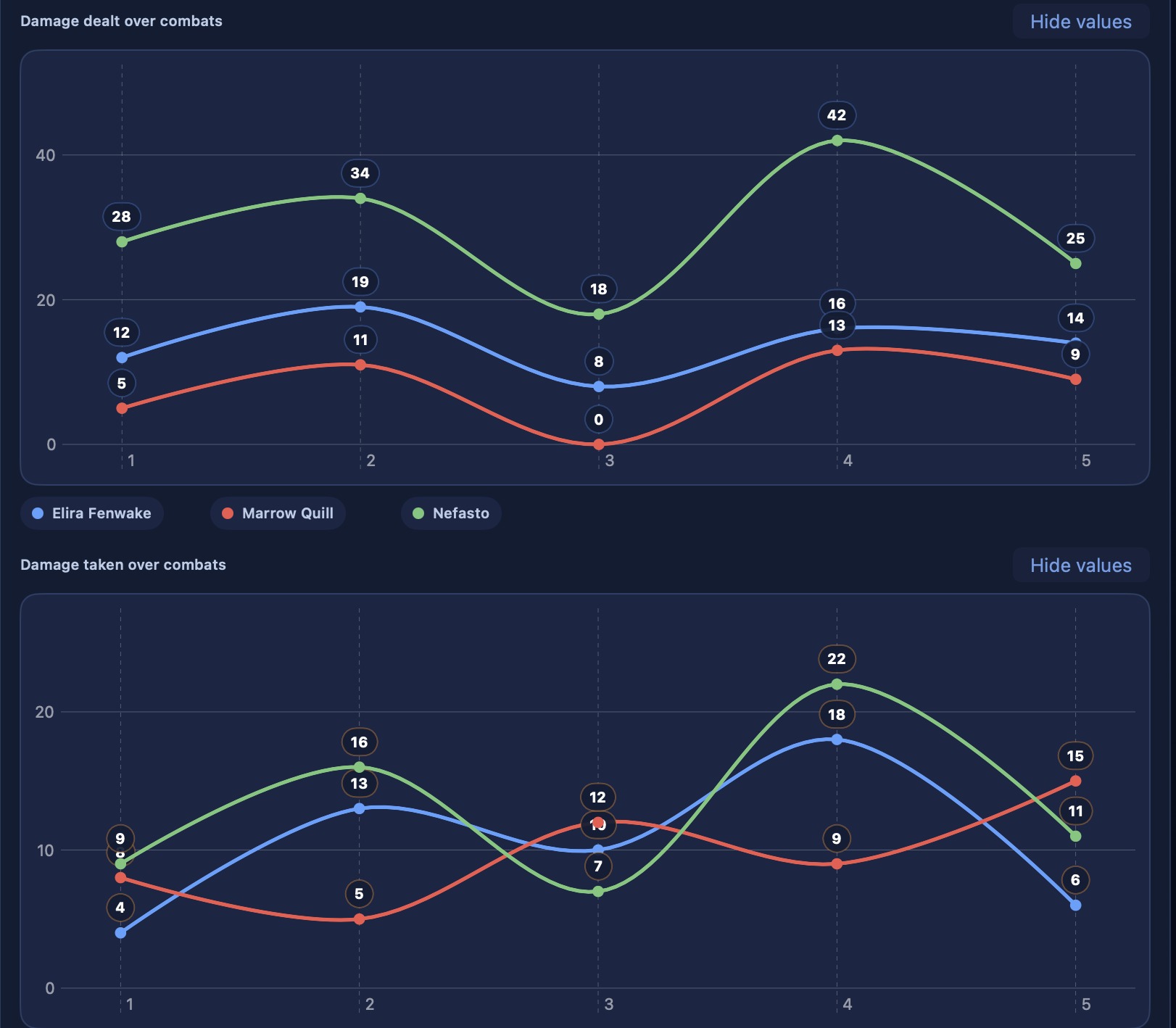
The saved session detail can also show charts for combats completed during that session:
- damage dealt by combat
- damage taken by combat
Each combat stays on the horizontal axis in chronological order. Characters who participated are shown even when they dealt or took 0 damage in a combat, so the series remains readable. If a character did not participate in a combat, they are not added for that point.
These charts help you understand who had the most impact during the session and who absorbed the most damage across encounters.
Fallen Heroes
When combat ends, the live session summary can also increase the count of fallen heroes.
This value is fed directly by the final combat result.
Live Session and Players Window
The live session is not the same thing as the Players Window, but the two are connected.
The live session provides the overall context of the game, while the Players Window is the visual presentation channel.
In particular:
- during combat the Players Window can show intro, current turn, and final summary
- outside combat, the Players Window can still be used to show images and content from the currently active context
Closing and Saving
When you choose Close and Save, DnDino:
- finalizes the session
- saves the collected data
- persists the timeline in the session linked to the adventure
- closes the global live context
After closing, the session remains available as a saved session.
Viewing a Saved Session
A completed live session can be reopened as a detail view.
In the detail panel you will find:
- summary and timeline
- recorded duration
- visited places
- combats played
- defeated enemies
- fallen heroes
- rankings of damage dealt and taken by the characters
- charts for damage dealt and taken in the session's combats
When It Is Most Useful
The live session is especially useful when you want to:
- keep DnDino open during play
- quickly note what really happens at the table
- know which places have been visited
- keep an ordered timeline of key events
- automatically fold combat into the session summary
In Practice
The live session is the bridge between:
- preparation
- operational game management
- final memory of the session
When used well, it greatly reduces the risk of losing important information during play and makes it much easier to reconstruct afterwards what actually happened in the campaign.